主画面の見かたUsing the main panel
画面下部のキーから選局・履歴・設定へ移動します。PLAYで再生または停止します。Use the bottom keys to tune, open history or change settings. PLAY starts or stops playback.
 123
- TUNERを開くOpen TUNERアンテナのアイコンから局検索を開きます。Tap the antenna icon to search for stations.
- PLAYで再生するPress PLAY同じボタンで停止。前後のキーでメモリー局を移動します。Press again to stop. Previous/next moves through saved stations.
局を検索して再生するFind and play a station
局名・国コード・ジャンルを組み合わせて検索します。局名を空欄にすると人気順に表示されます。Search by station name, country code and genre. Leave the station name empty to browse popular stations.
 12345
- 検索条件を入力Enter search details日本はJP。世界中を探す場合は国コードを空欄にします。Use JP for Japan, or leave Country blank for worldwide results.
- 検索結果を確認Review the results局ロゴ、局名、ジャンル、形式、ビットレートを確認します。ロゴを取得できない局にはラジオのプレースホルダーが表示されます。Review the logo, station name, genre, format and bitrate. A radio placeholder appears when no usable logo is available.
- 再生するPlay a station右側の再生ボタンをタップします。地球アイコンがある場合は局のWebサイトを開けます。Tap the play button on the right. When shown, the globe icon opens the station website.
お気に入りを保存するSave favorites and revisit history
メモリーは20局、履歴は最大500件。どちらも端末内に保存されます。Save up to 20 stations and keep up to 500 listening-history entries on your device.
- 空のメモリーをタップTap an empty memory局の再生中に主画面の空の番号をタップします。While playing, tap an empty numbered memory on the main panel.
- 履歴から局へ戻るReturn from History時計の矢印アイコンを開き、履歴項目の再生ボタンをタップします。Open the clock-arrow icon and tap the play button on an entry.
- 削除するRemove entriesメモリーは設定のマイナス、履歴は「履歴を消去」で削除します。Use minus in Settings for memories, or Clear History for history.
 1
スキン・配色・描画レートSkins, colors and display rate
歯車を開くと、見た目と描画負荷を調整できます。配色はスキンごとに記憶されます。Open the gear to personalize the look and performance. Colors are remembered per skin.
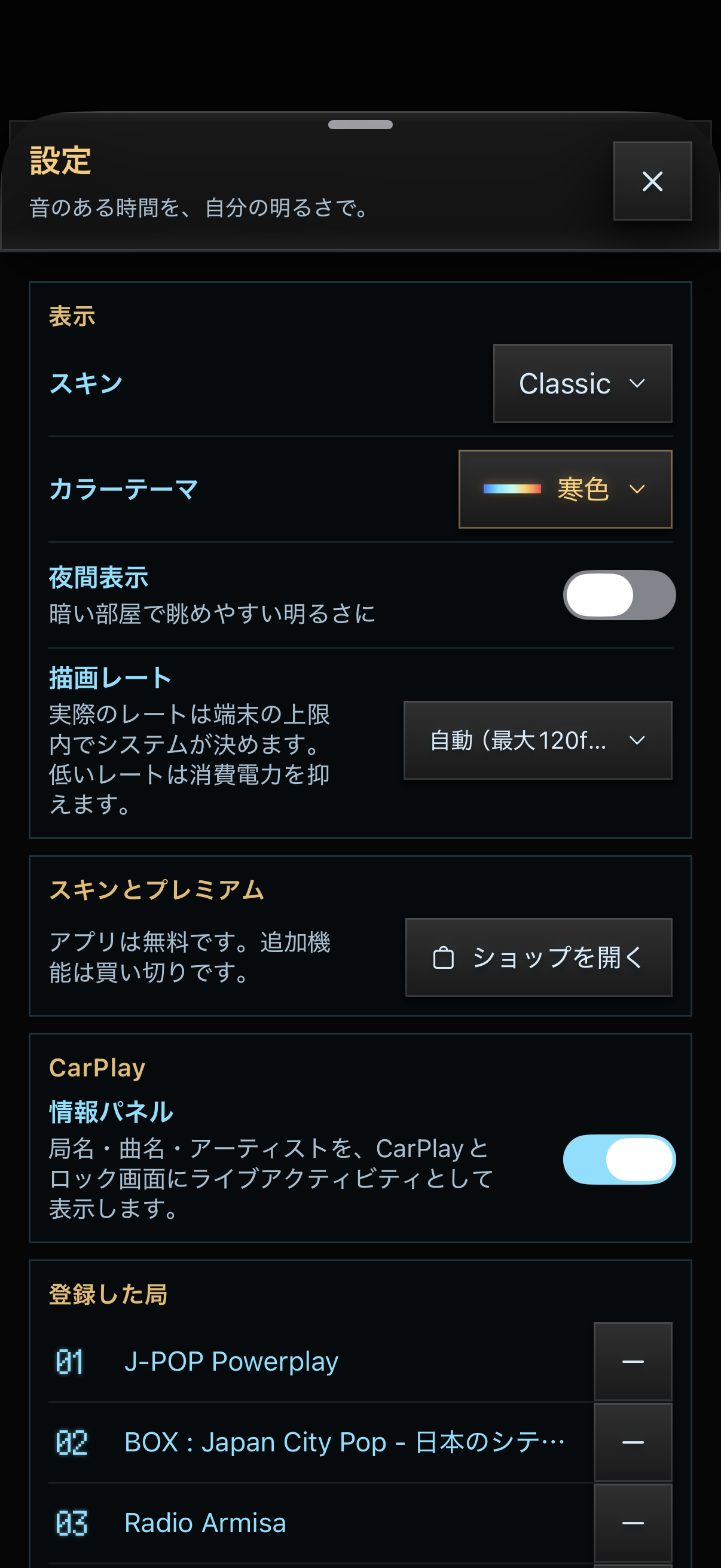
 1234
スペアナ以外の数値の見かたReading the other numbers
主画面の数値は、再生中のストリームと端末の状態を示します。回線速度テストの結果ではありません。値を取得できないときや停止中は「--」になります。The main-panel readouts describe the current stream and device state. They are not the result of a network speed test. “--” means the value is not yet available or playback is stopped.
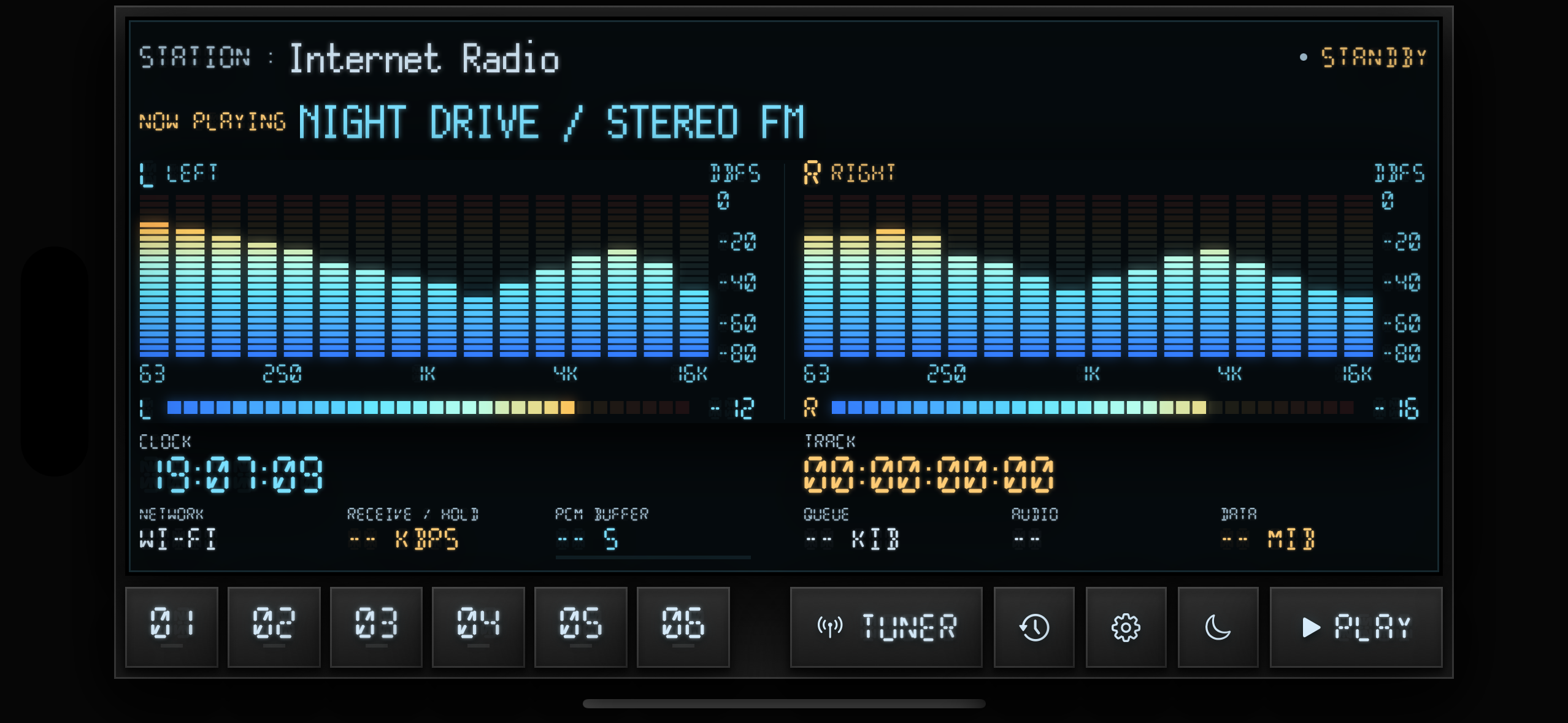
- LOCAL TIME
- iPhoneの現在時刻。時:分:秒で表示します。The iPhone’s current time, shown as hours:minutes:seconds.
- STN
- 選択中の局に設定したタイムゾーンの現在時刻。自動判定できない国は設定で地域を選びます。Current time in the selected station’s time zone. Choose a region in Settings when it cannot be determined automatically.
- TRACK
- 現在の曲の経過時間。曲情報または局が変わると0に戻ります。曲情報がない局では局の再生時間です。末尾のFFは0〜29のフレームです。Elapsed time for the current track. It resets when track metadata or the station changes. Without track metadata, it shows station playback time. The final FF counts frames from 00 to 29.
- RECEIVE / RX
- 実際に受信している音声データ量をKBPSで表示します。瞬間値なので上下します。The current audio receive rate in KBPS. It is a live value and will fluctuate.
- NOMINAL KBPS
- 配信側が示す公称ビットレート。実測の受信速度とは異なります。The stream’s declared nominal bitrate, which is different from the measured receive rate.
- PCM BUFFER
- デコード済み音声が何秒分待機しているかをS(秒)で表示します。How many seconds of decoded audio are queued, shown in S (seconds).
- QUEUE
- 受信済みで処理待ちの圧縮データと生データの合計をKiBで表示します。Pending compressed and raw network data awaiting processing, shown in KiB.
- AUDIO
- 検出したコーデックとデコーダー出力のサンプルレート。例: MP3 44.1K。Detected codec and decoder output sample rate, for example MP3 44.1K.
- DATA
- 現在のストリーム/再生セッションで受信した累計データ量をMiBで表示します。Total data received during the current stream/playback session, shown in MiB.
- NETWORK / ECO
- 現在利用できる回線種別。WI-FI、CELL、WIRED、OTHER、OFFLINEを表示し、低データモード時はECOが付きます。The available connection type: WI-FI, CELL, WIRED, OTHER or OFFLINE. ECO appears when Low Data Mode is active.
- GENRE
- 局から提供されたジャンル情報です。Genre information supplied by the station.
- META
- 曲名などのICYメタデータを受信した瞬間にランプが短く点灯します。The lamp flashes briefly when ICY metadata, such as a track title, arrives.
CarPlay
保存した局を選び、再生中情報を確認できます。運転中は注視せず、安全なときだけ操作してください。Choose saved stations and view Now Playing. Do not become distracted while driving; interact only when safe.
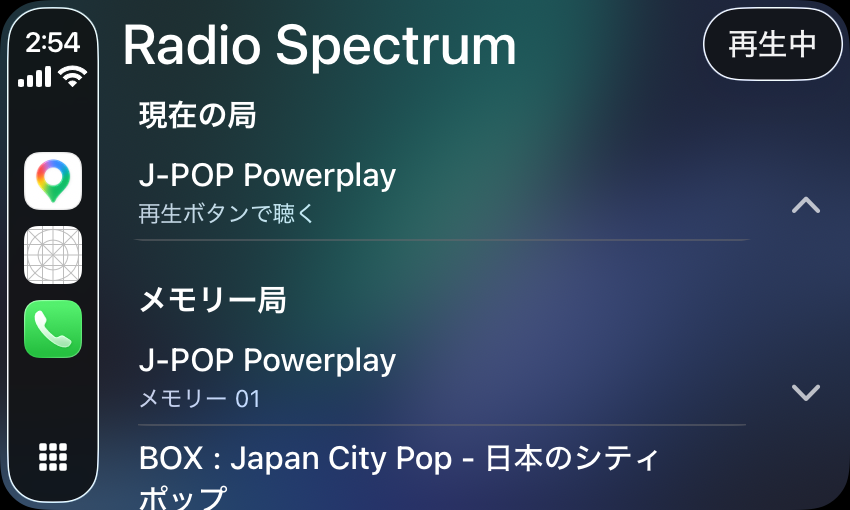
 12
Apple Watch
ペアリングしたiPhoneの再生を操作するリモコンです。Watch単独では再生できません。A remote for playback on the paired iPhone. It cannot play independently.
 123
再生できないときWhen a station does not play
- 別の局を試すTry another station配信停止、地域制限、回線側のブロックの場合があります。The stream may be offline, region-restricted or blocked.
- 通信を確認して再試行Check the connectionWi‑Fiとモバイル通信を確認し、少し待って再生します。Check Wi‑Fi or cellular data, wait briefly and retry.
- 購入を復元するRestore purchases買い切り5種類が対象です。任意の支援3種類は消耗型で復元されません。Covers five one-time add-ons. Three consumable support items cannot be restored.
対応言語Supported languages
このヘルプとプライバシーポリシーは日本語と英語で公開しています。アプリの検索・設定・エラー・履歴は、端末の言語に従い13言語(日本語、英語、アラビア語、ドイツ語、スペイン語、フランス語、ヒンディー語、インドネシア語、イタリア語、韓国語、ブラジルポルトガル語、簡体字中国語、繁体字中国語)で表示します。主画面は英語表示です。This help and the privacy policy are published in Japanese and English. In the app, Search, Settings, errors and History follow the device language in 13 languages: Japanese, English, Arabic, German, Spanish, French, Hindi, Indonesian, Italian, Korean, Brazilian Portuguese, Simplified Chinese and Traditional Chinese. The main panel is shown in English.
解決しない場合Still need help?
アプリとiOSのバージョン、機種、再現手順をお知らせください。パスワードやカード番号は送らないでください。Include app and iOS versions, device model and reproduction steps. Never send passwords or card numbers.
lumatuner.support@gmail.com公開URLPublic URL: https://lumatuner-app.pages.dev/support/